
Introducing UuUp, the app that take back your mornings
Design
UX
Indigo Design Award
C2A Design Award
Challenges
In a market saturated with alarm apps, they tend to introduce complexity, continue to offer snooze functions that actually that actually disrupt sleep, deviating from their intended user benefits.

"My alarm’s snooze is too accessible!”
Online Comment

“I just wanted a simple alarm, but these apps feel like navigating a maze.”
Forum Post

"The setup process of my alarm app is so complex, I often just give up and use the default.”
Social Media

"Trying to set a simple recurring alarm shouldn’t be this time-consuming and confusing.”
App Review
My Vision
UuUp is a creative attempt to provides a customizable alarm experience that adapts to individual resting patterns and chronotype. This integration aligns with the varied lifestyles of modern users, ensuring a more controlled and conscious start to their day.
Context
Beneath the allure of advanced features, modern alarm apps overlook essential user experience elements. They introduce complexity, disrupt sleep with ineffective snooze functions, and complicate setup processes – all contrary to their intended user benefits.
#1 Overly Complex Features
Creative yet complex features in some apps overwhelm users who prefer simplicity.
#2 Snooze Functionality
The ease of the snooze button often leads to oversleeping and and can easily disrupted sleep patterns.
#3 Difficulty in Setup
Many users find setting up multiple or recurring alarms unintuitive, adding unnecessary stress to their routines.
"How might we deliver an intuitive alarm
experience that’s efficient without demanding users to alter their habits?"
APPROACH & PROCESS
To differentiate UuUp in a crowded market, I explored users' natural wake-up behaviors and their views on effective get up methods. My aim was to gain insights into varied morning routines and the role of chronotype, without pre-empting the design outcomes.
Investigate
Morning routines & tasks to optimize the wake-up experience
Examine
Night-time practices to streamline alarm setups
Analyze
Individual habits and lifestyles to tailor the app's functionality
Explore
Possibility of integrating chronotype to influence flows
“Understand wake-up behaviors and incorporate chronotype.”

DESIGN SNEAK PEAK
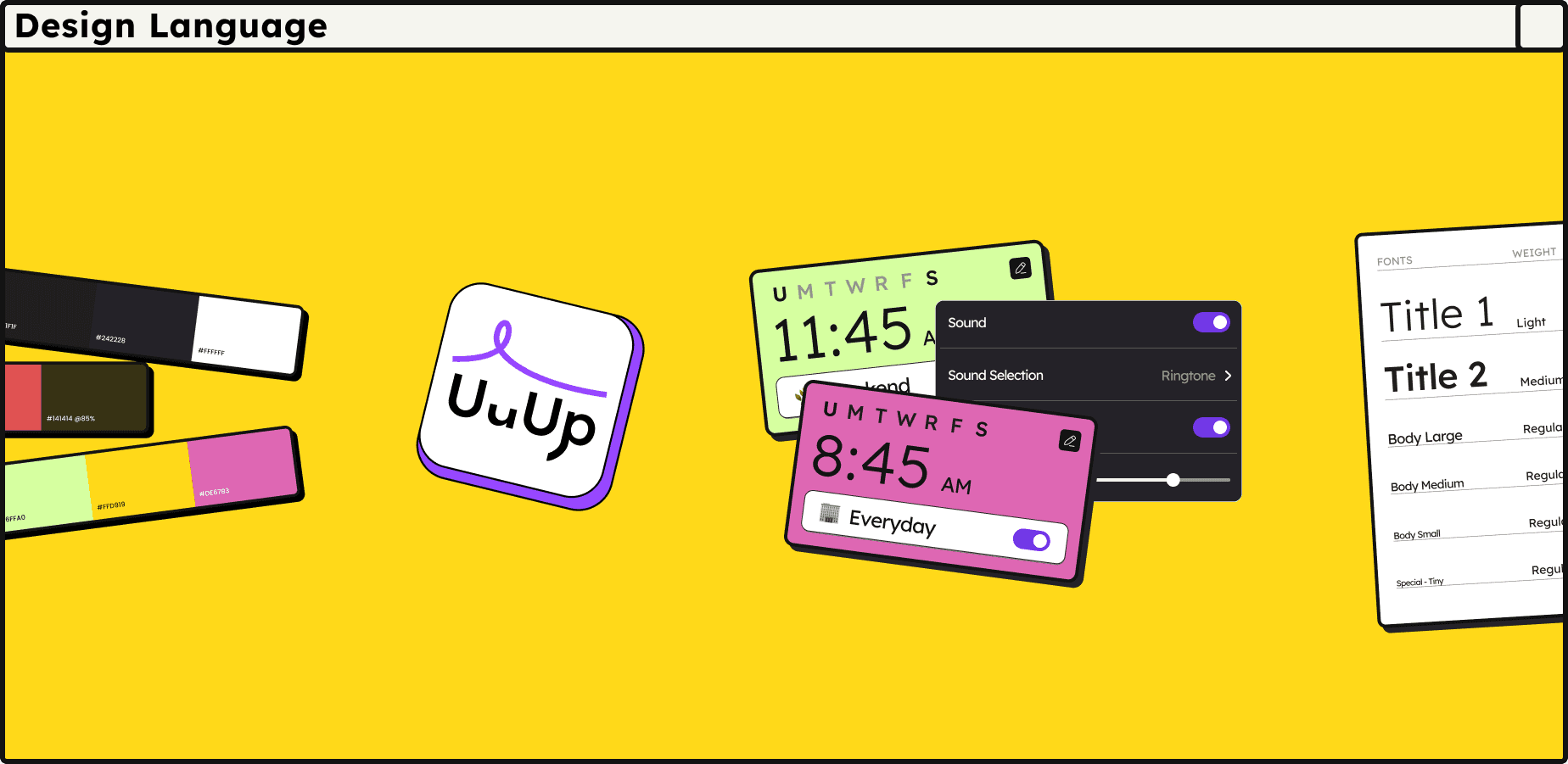
UuUp’s design language fuses Neubrutalism's bold audacity with Monochrome Flat Design's simplicity and ease of use, creating an impactful yet user-friendly interface.
To Understand the Industry
Macro Research
START WITH COMPETITIVE ANALYSIS
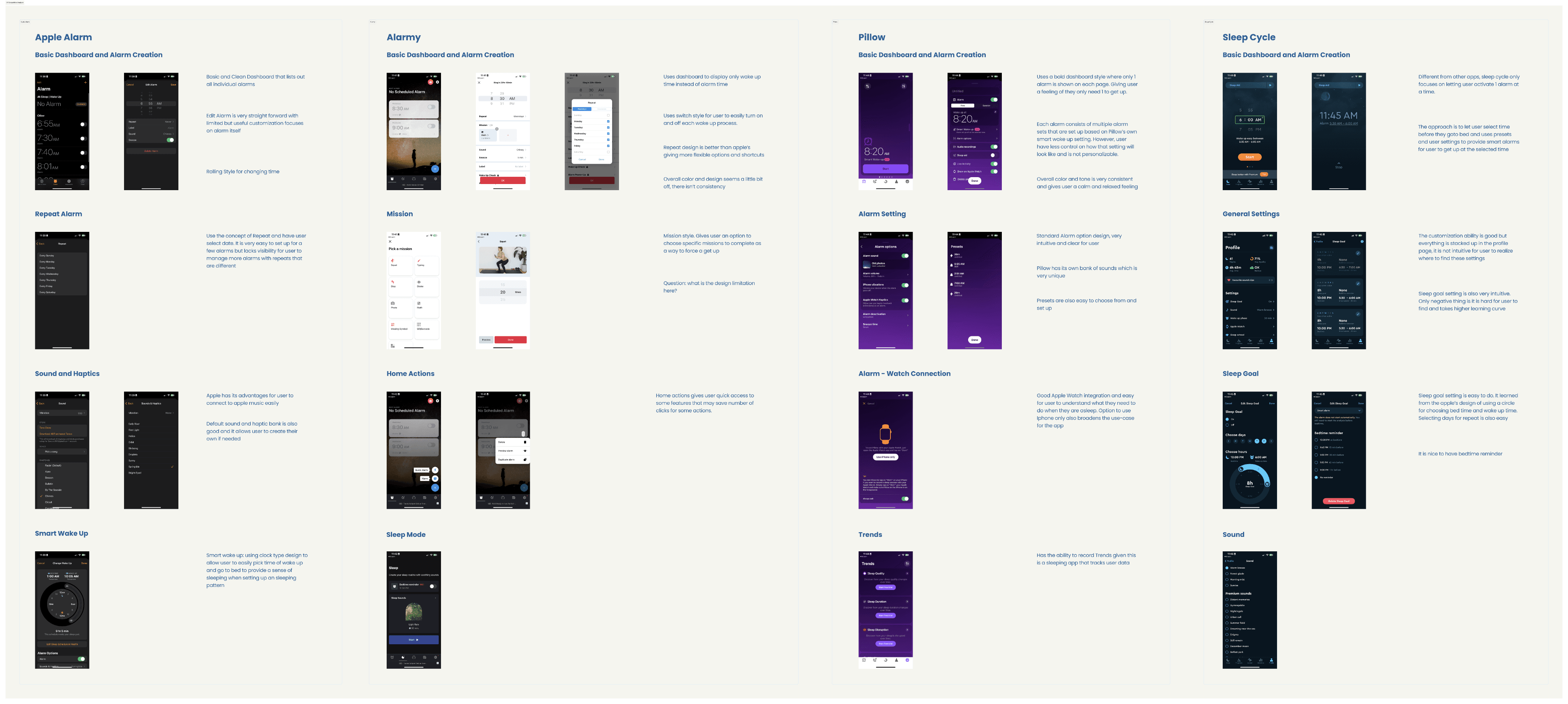
I initiated with a competitive analysis on 4 industry leaders to identify a feature opportunity in wake-up related routines.
I initially explored functions and logic flows regarding time selection and wake-up mechanisms. Many modern designs appears to share vast commonalities in the basic functionalities but were significantly vary in how they approach specific elements, such as user customization and integration with wake-up related routines.
To Identify user needs
User Research
10
End User Interviews
4
Unique Personas
User Interviews
To guide the initial design direction of the platform, I conducted interviews with 10 diverse participants to directly gather persona-specific needs on wake-up related routines.
Approach
I sourced participants with diverse professional, age, and background groups to gain a holistic understanding of user's real-life challenges. My goal was to focus on their real-life routines and personal perspectives on how the alarm process impacts the routines currently.
Career
Age
Gender
INSIGHT 01
Situational Nature of the Wake-Up Process
Wake-up times vary due to lifestyle roles and activities, with inconsistent, consistent, and occasional patterns.
Implication #1:
“Alarm app should adapt to the variability of user’s daily lives.”

INSIGHT 02
Different responses to alarms driven by Wake-Up Motivation
Central to wake-up motivation are discipline, responsibility, and the consequences.
Implication #2:
“Alarms should promote time and task awareness for users. Perhaps with features that allow users to be reminded of time in the morning”

INSIGHT 03
The Coexistence of Routine and Ad-hoc alarms
There is a blend of daily routine alarms with the occasional, situational ones

Implication #3:
Alarm setups should be intuitive enough to support both quick setups for one-off needs and more habitual, recurring alarm schedules.
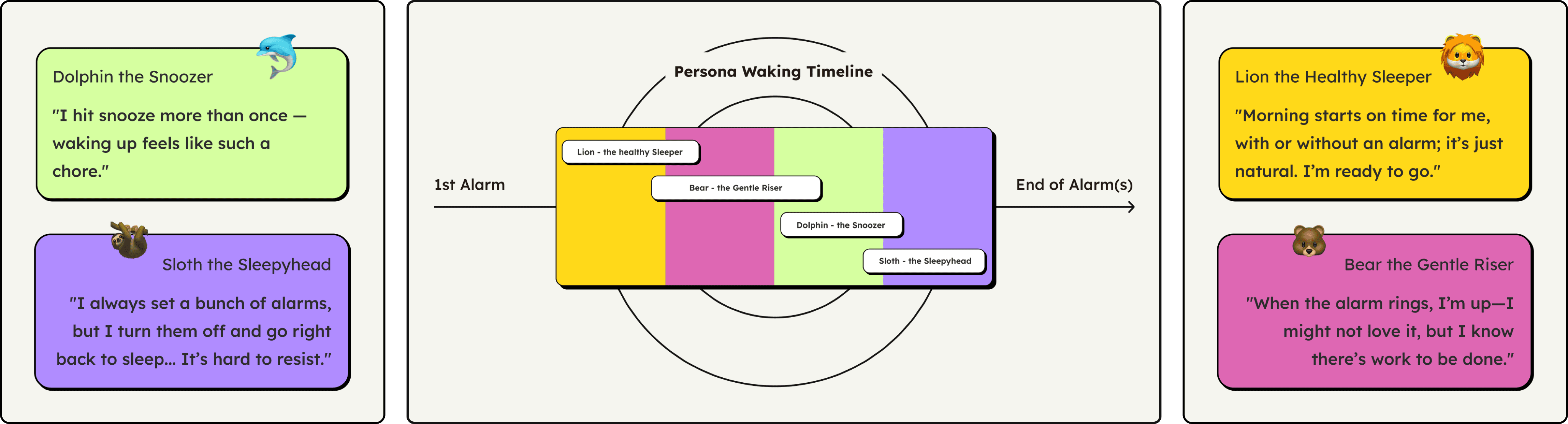
A set of persona and corresponding wakeup timeline was also created to streamline the user's behaviors and habits.
DESIGN SPECIFICATIONS
Design Scope #1
Home Screen & Main Interaction
Step 1: What should home screen have?
To accommodate user's changing daily routines, I decided to design the home screen to assure an easy setup for both quick one-time needs and recurring routines. Home screen isn't the most visited screen in an alarm app, but is the most crucial one. Thus, I wanted to make sure the design is straight forward and simple that allows quick setups and overall alarm management.
Intuitive
Should be easy to setup for both quick one-time needs and recurring routines
Reliable
Should provide assurance, easy to double-check at a glance
Step 2: How to design, iteratively?
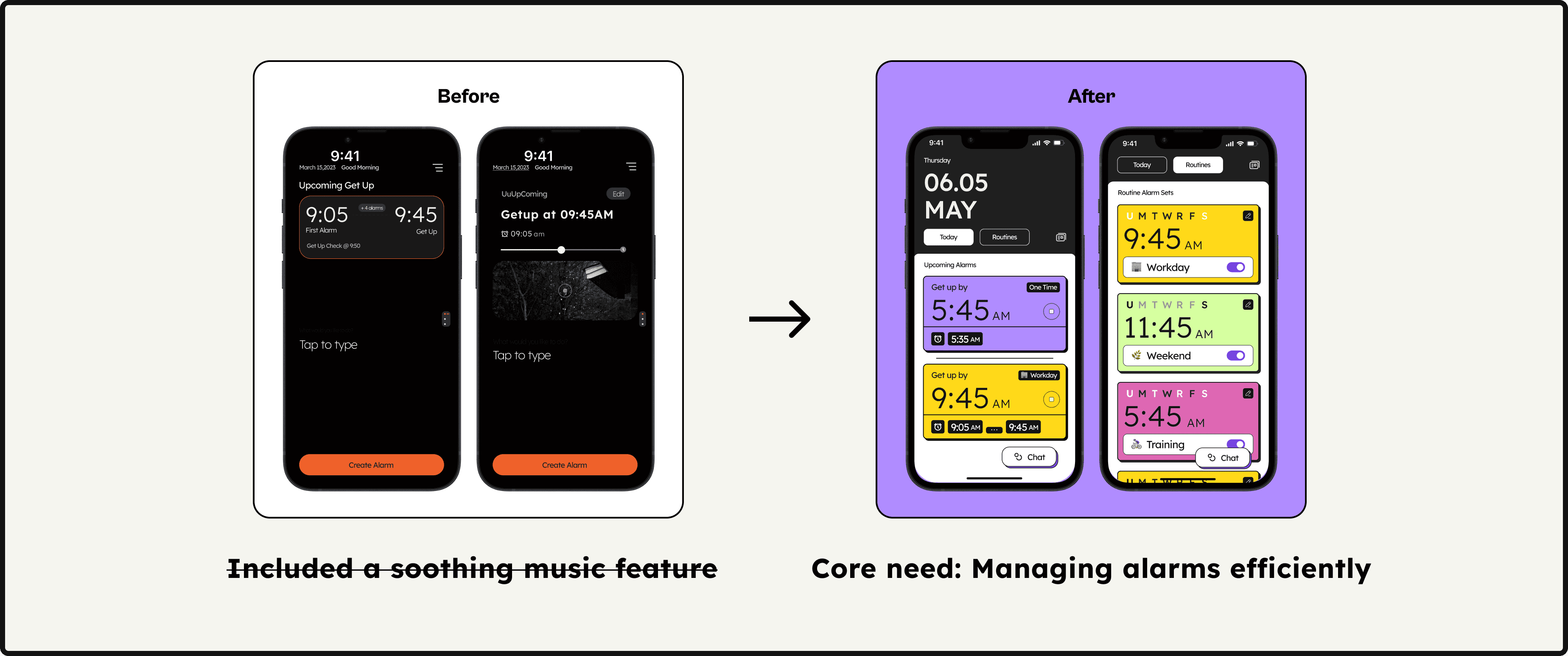
Early iterations attempted to focus on displaying the upcoming alarms as well as a music feature. However, how many times would a user to go back to an alarm app after the alarms are set? An music feature is in fact irrelevant to the actual user flow.
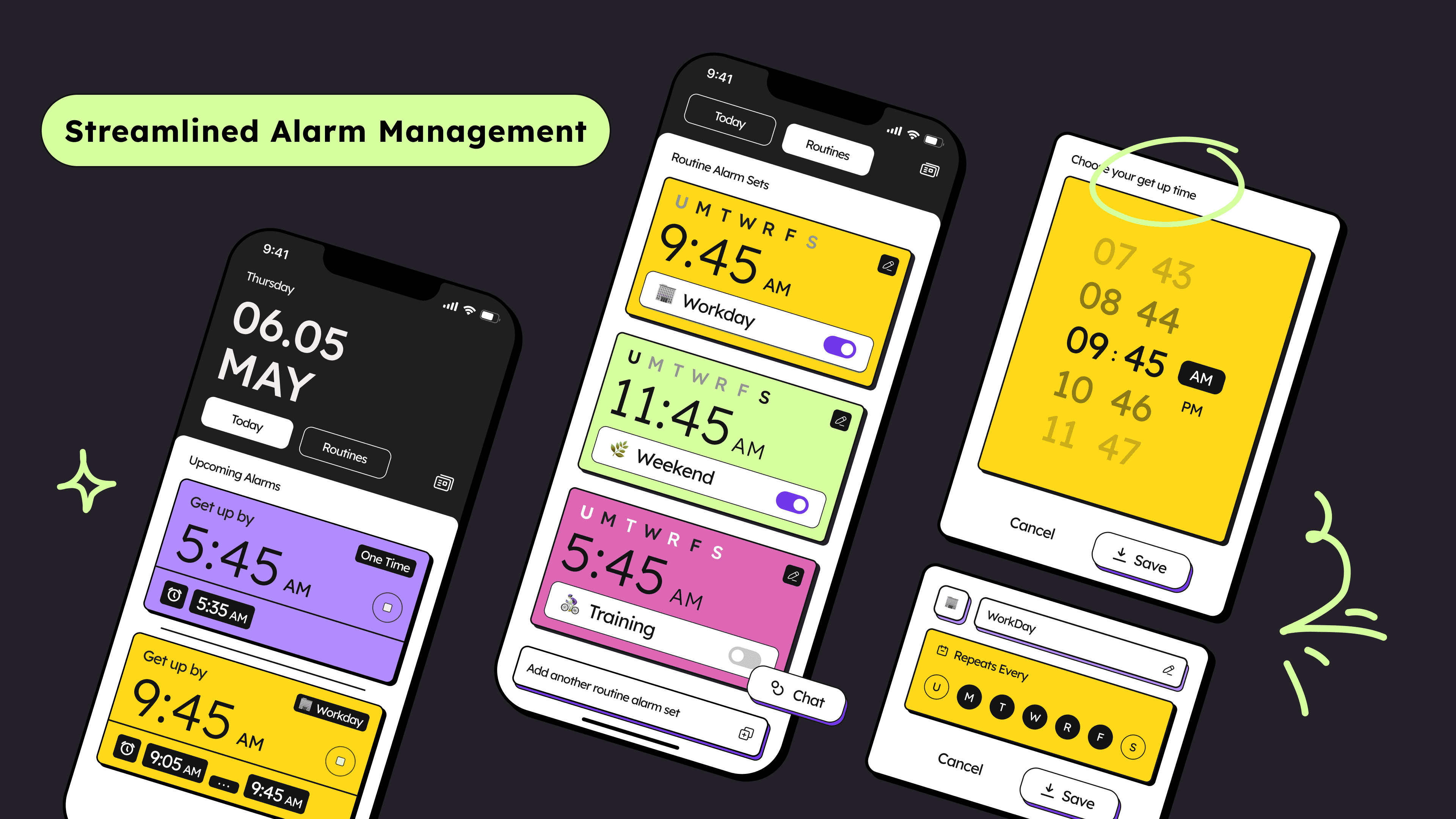
I decided to rethink the structure of the page focusing on the core responsibility of a home screen - managing alarms efficiently. With the existence of routine alarms and ad-hoc alarms, I created a separate "Routine" and "Today" tab for user to easily managing all alarms with distinct characteristics.
Step 3: Specifics
Today View
Enables users to glance at all alarms set for the day
Allows users to quickly set up one-time alarm or manage upcoming routine in one place.
Routine View
Offers a dedicated space for managing recurring alarms, keeping the interface organized and easy to navigate.
Design Scope #2
Alarm Logic Settings
Step 1: What's a good alarm setting logic?
The quality of a good alarm customization and personalization rely on a stress-less setting logic. My market study revealed how users generally feel overwhelmed by the complexity and mental stress of setting up multiple alarms. I decided to simplify the process by distinguish between waking up time and getting up time.
Simplicity
The alarm setting process should be simple and easy.
Clarity
Clearly distinguish between waking up and getting up
Step 2: What to design?
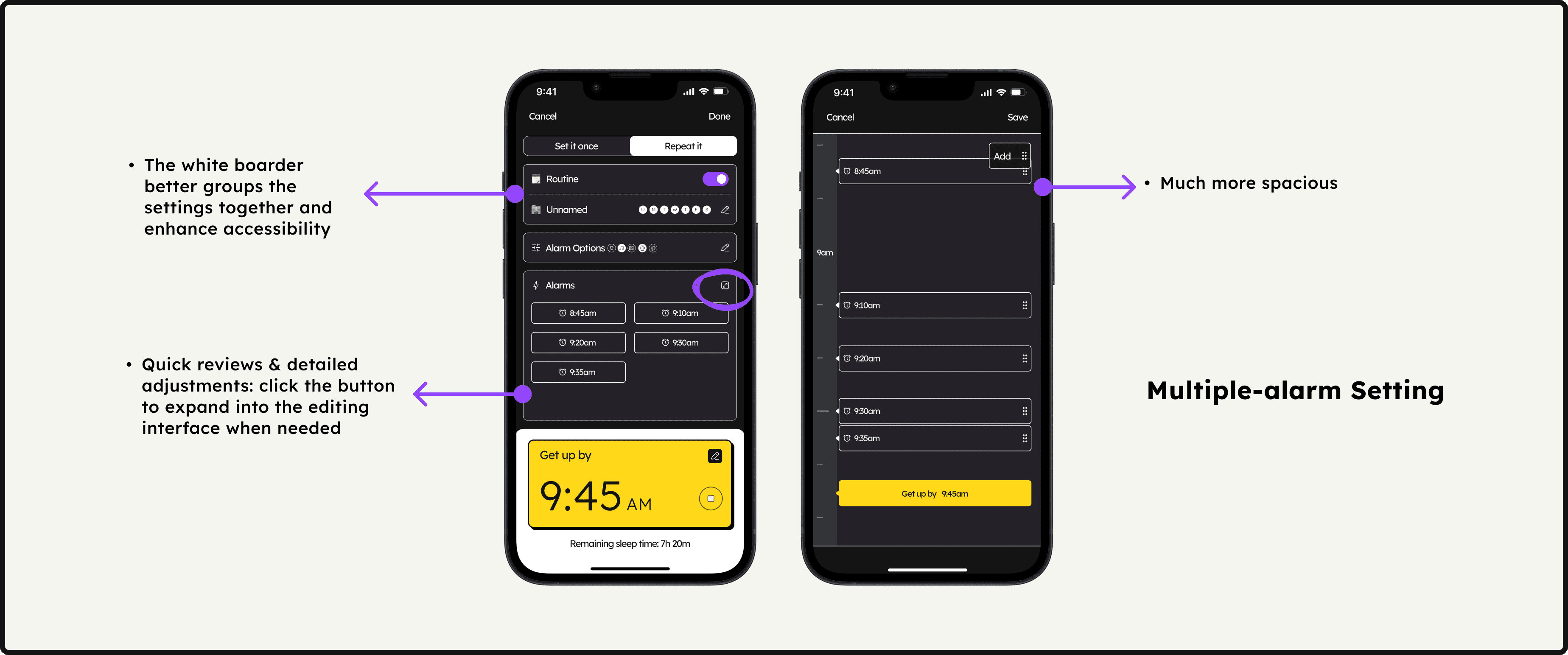
“Simplify the process by asking for a single get-up time”
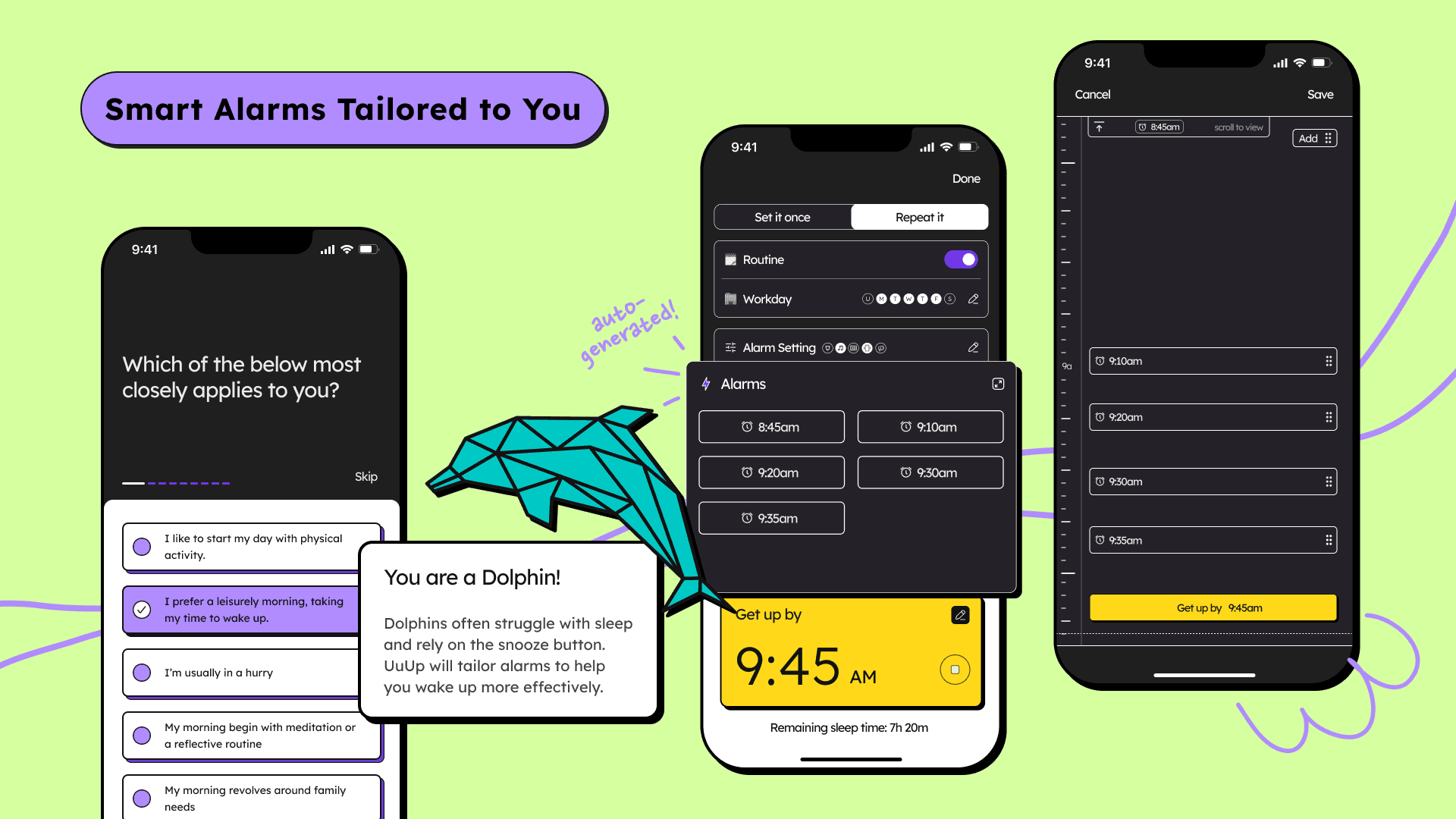
To simplify user's mental load when setting up time for the alarm, I decided to only ask user a single get-up time with auto generated individual alarms leading to that get-up time based on user's unique personas. To allow easy control in the interface, I incorporated a editing mode for the individual alarms that allows quick reviews and detailed adjustments when necessary.
Step 3: Specifics
Single get-up time
Allows users to adjust alarms easily on a proportional time scale, eliminating the need for manual calculations.
Visual alarm editing
Users only input one get-up time, and then UuUp helps them to work backward to set to auto-suggest wake-up alarms
Design Scope #3
Personalization
Specifics
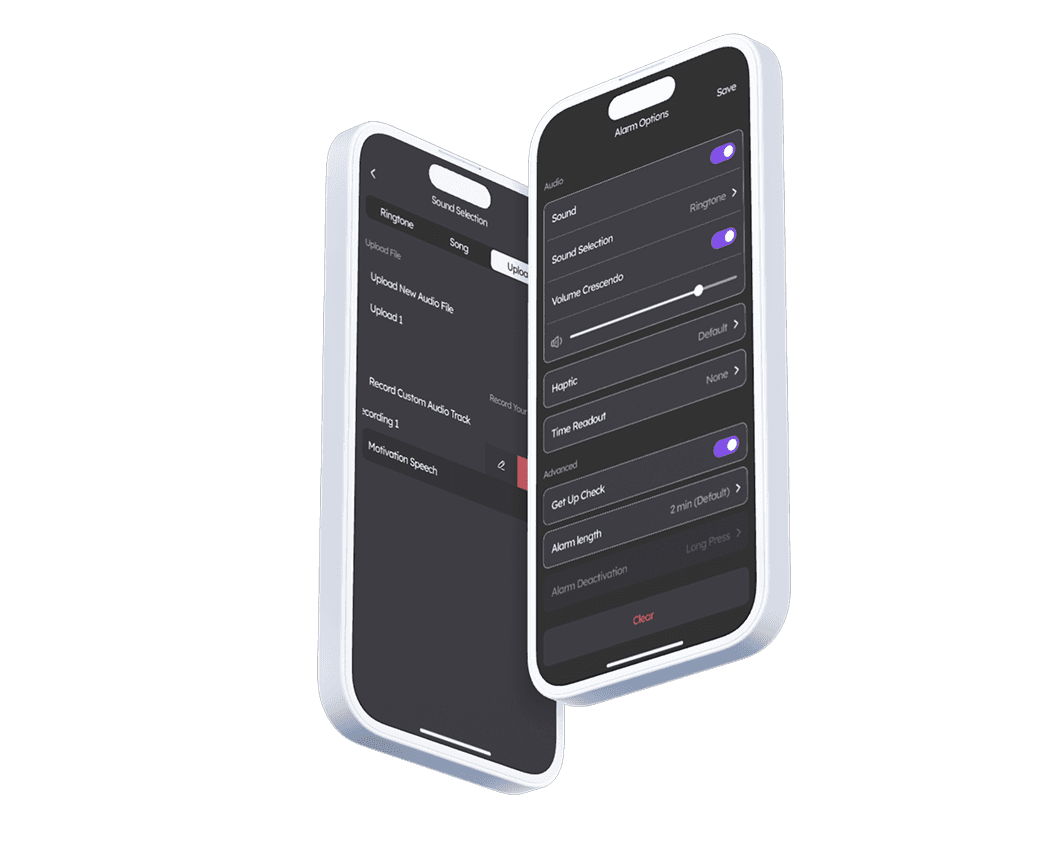
Customizable Alarm Settings
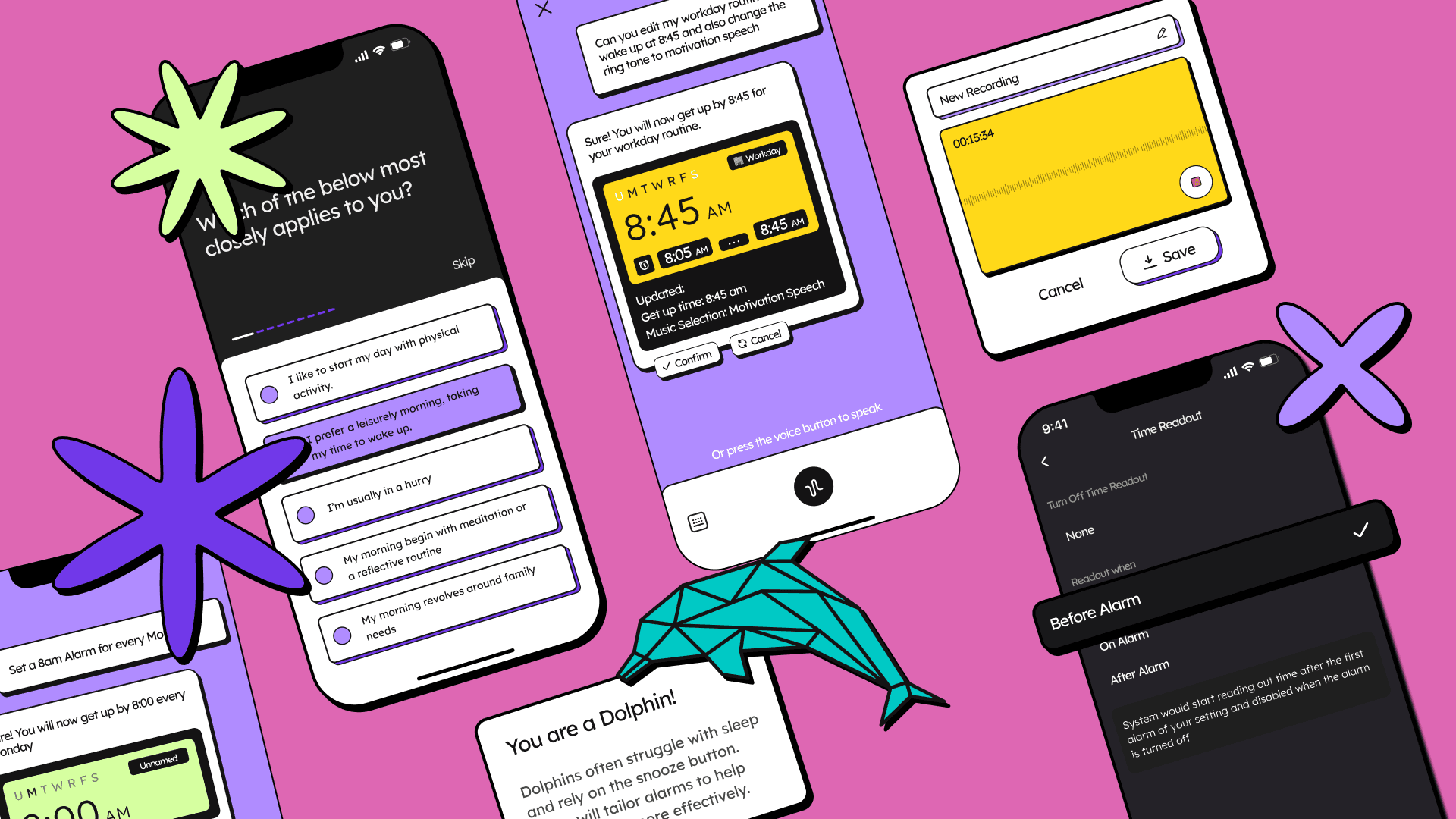
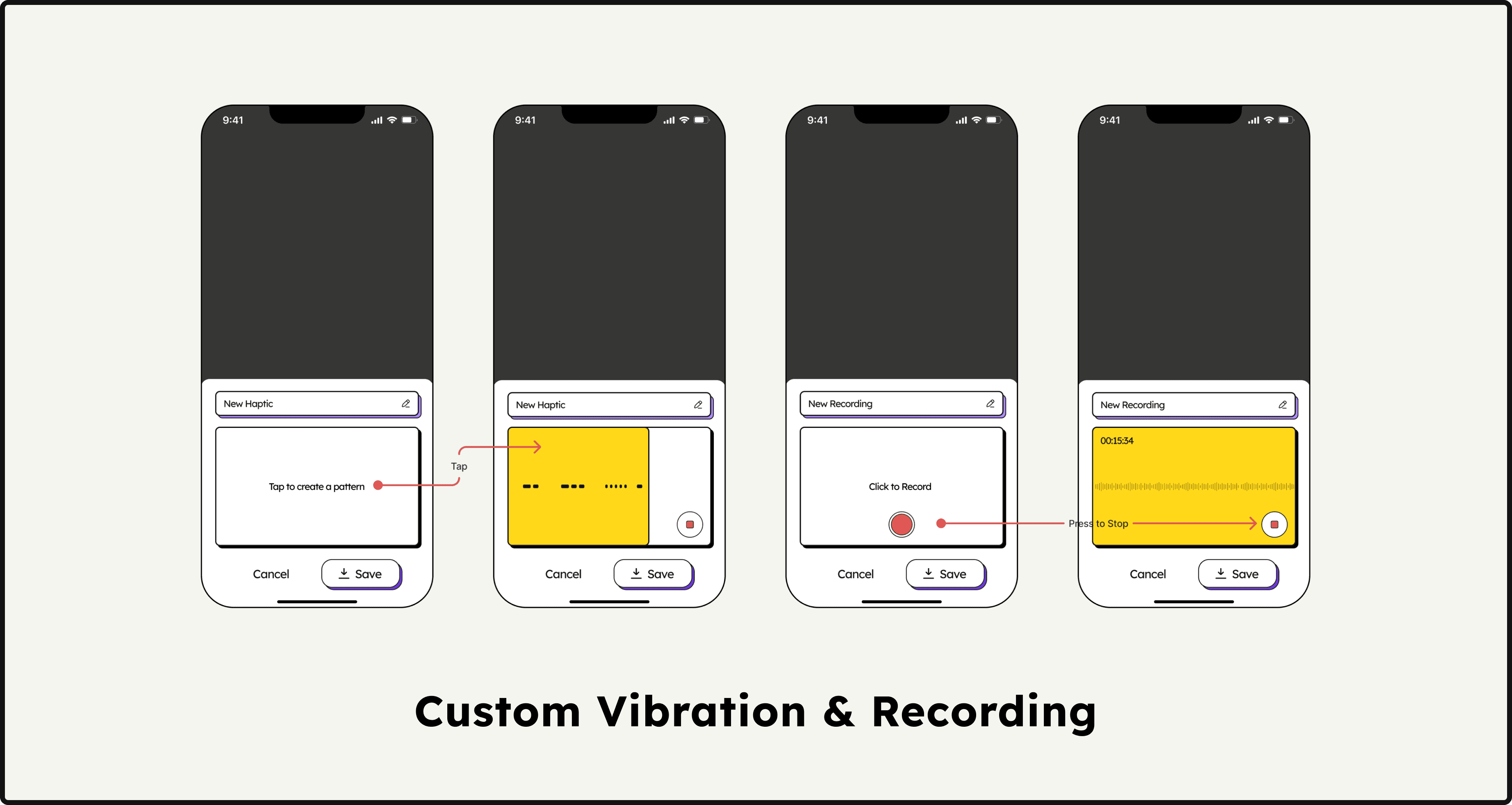
Users can choose from preset ringtones, upload their own soundtracks, or even record custom sounds for their alarms. After all, who knows how to motivate you better than yourself?
Specifics
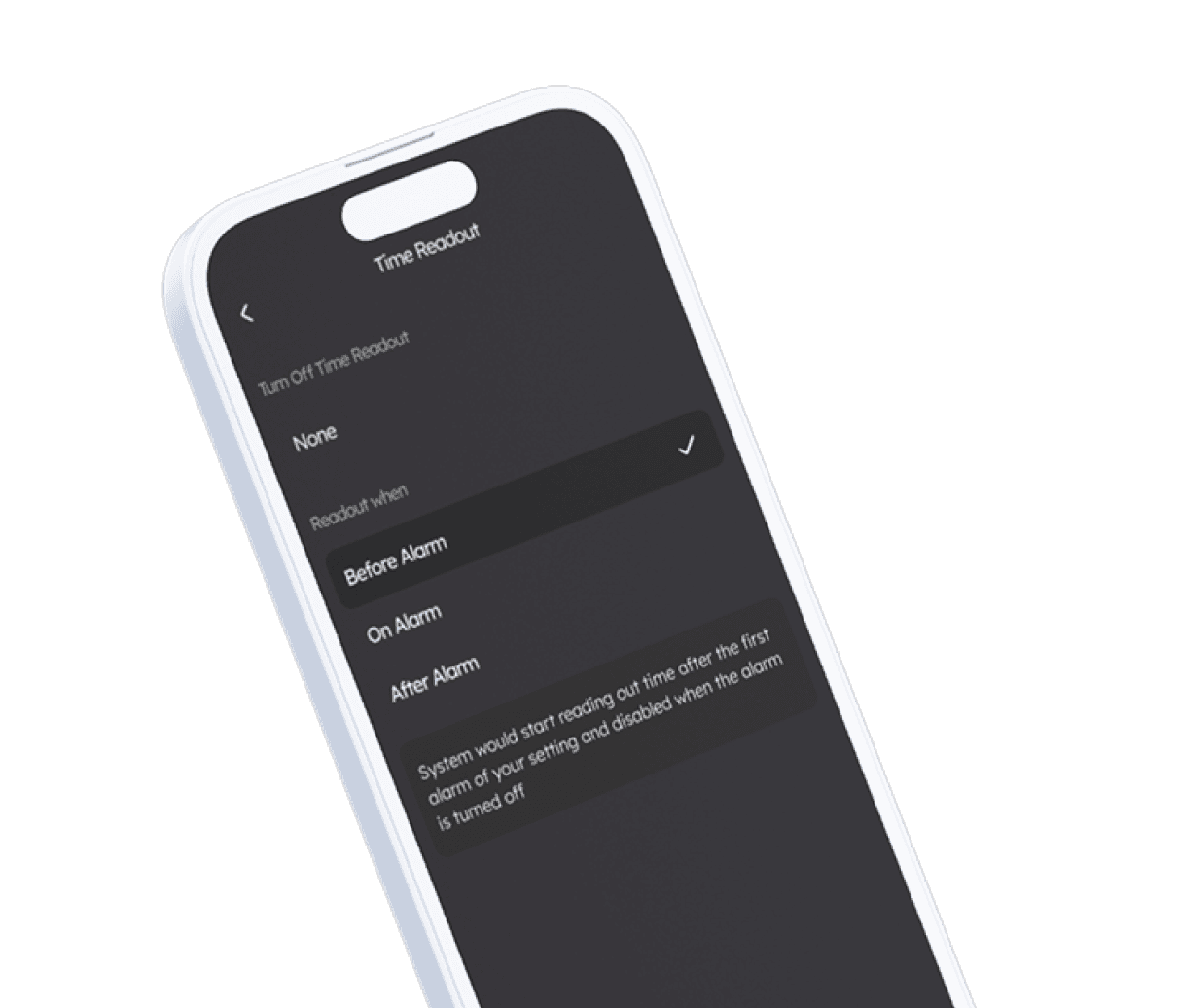
Time Readout
Time Awareness: Adds an auditory layer of information by reading out the exact time during the alarm, fostering a greater awareness of time.
Specifics
Custom Alarm Patterns
Provides an added layer of personalization by allowing users to record and set their own vibration patterns.
Product Design
Interaction Design
Design Systems
0→1 Design
Systems Thinking
December 3rd, 2025